A few days ago I got my latest parcel from Hace electronics an order I had made for Christmas. Inside were three HACEduino Nano's with an ATmega328 on them, I carefully unpacked the package and got a bit of a surprise, Adrian had upgraded my breadboards as he had said he would, but the boards I got were much bigger then I had expected.
As well as the nano's and breadboards there were three complimentary USB cables to program the Haceduino Nanos's and three protoshields (Ver B) to build a project on to. I have wrapped them all up and placed them under the tree, I did solder one of the protoshields together so the kids can copy it on Christmas day.
I did have a look at one idea I have had about using the protoshield as a mounting board to prototype for the HACEduino nano, so far it looks like the concept is sound now I just have to play with it on christmas day and then I will blog about it and will also have some photos for you.
Have a great festive season.
Showing posts with label Technology. Show all posts
Showing posts with label Technology. Show all posts
Thursday, December 3, 2009


Monday, November 30, 2009
MIcks latest valve project
Well Mick has been up to it again, he has been fiddling with bits and pieces of electronics and has come up with an amp for his guitar. I will leave it to him to describe it in more depth as it is pretty out there.
Wednesday, November 18, 2009
Creating A Linux Arduino Development Enviroment
I started playing with my haceduino 2009 and couldn't get it to upload sketches to my board, I played for a while trying to hit the reset switch at different times but with no luck.
I hooked the board up to a windows machine and had it uploading almost right away so this led me to my Linux machine being at fault. What to do, what to do....
So last night I played with a few different Linux distros to find one that works "right out of the box" so to speak. It had to be a mainstream distro, had to be a clean install and only need packages available from the repos so as not to have to revert to compiling from source.
This guide is to set up a machine from scratch with the latest Ubuntu release 9.10, it should work with kubuntu and xubuntu as well but I offer no warranty as to the sutablity of this guide to your own hardware and setup
I hooked the board up to a windows machine and had it uploading almost right away so this led me to my Linux machine being at fault. What to do, what to do....
So last night I played with a few different Linux distros to find one that works "right out of the box" so to speak. It had to be a mainstream distro, had to be a clean install and only need packages available from the repos so as not to have to revert to compiling from source.
This guide is to set up a machine from scratch with the latest Ubuntu release 9.10, it should work with kubuntu and xubuntu as well but I offer no warranty as to the sutablity of this guide to your own hardware and setup
INSTALLING ARDUINO IDE FOR THE HACEDUINO 2009 ATmega328 UNDER UBUNTU KARMIC KOALA
Do a fresh install of Ubuntu Karmic Koala 9.10
At the command line perform the following commands to prepare your system for the arduino IDE.
- sudo apt-get update (Update Package list)
- sudo apt-get upgrade (Upgrade all installed packages)
- sudo apt-get remove brltty (Remove as it conflicts when uploading sketches)
- sudo apt-get install sun-java6-jre avrdude gcc-avr avr-libc ftdi-eeprom (Install dependencies for the Arduino IDE)
- cd ~/ (change to your home directory)
- wget http://arduino.googlecode.com/files/arduino-0017.tgz (Download IDE from googlecode)
- tar xzvf arduino-0017.tgz (extract files from the archive)
- sudo reboot (reboots the machine)
- Plug your Haceduino in to a USB port and wait 10 seconds for it to connect
- To run the IDE you need to exucute the file ~/arduino-0017/arduino this will launch the IDE
- Go to tools/board/arduino and select Duemilanove or Nano w/ ATmega328
- Go to tools/serial port/devttyUSBx (Select the port your board is plugged in to)
- Load a sketch from the examples choices, the file/digital/blink is a good start to make sure it is working as it doesnt require any additional hardware apart from the haceduino and a USB cable
- Click on the upload button second icon from the right at the top of the IDE and the sketch should compile and be uploaded to the Haceduino 2009, the red and green serial traffic LEDs should flash for a few seconds
- You should now have an orange LED blinking on the haceduino that is different to the dit dit dah flash that was all ready on the haceduino.
- By playing with the values in the sketch you should be able to make it blink faster or slower, why don't you have a try now.
Saturday, January 13, 2007
Thursday, December 14, 2006
Brand new substance created from water
Well the new text books that we have to buy for my son next year will be out of date already after this discovery, brains over Los Alamos think tank have found by sheer luck a new state of "water" and it is an alloy of all things, but don't think about making this at home guys, with enough xray power to turn your sperm in to glow in the dark taddys and pressure 170,000 times what we feel at sea level which youll need to hold for ten hours (you paying the power bill) and you will have some of this stuff. Ohh and to keep it stable it has to be kept over 10.000 atmospheres.. So lets see we have Solid H2O-ice, liquid H2O-water, gaseous H2O-steam, Supercooled H20, Densest state of water at 4 degrees C and now a water alloy that makes 6 states of H2O double the amount I was taught about at school.
Well the new text books that we have to buy for my son next year will be out of date already after this discovery, brains over Los Alamos think tank have found by sheer luck a new state of "water" and it is an alloy of all things, but don't think about making this at home guys, with enough xray power to turn your sperm in to glow in the dark taddys and pressure 170,000 times what we feel at sea level which youll need to hold for ten hours (you paying the power bill) and you will have some of this stuff. Ohh and to keep it stable it has to be kept over 10.000 atmospheres.. So lets see we have Solid H2O-ice, liquid H2O-water, gaseous H2O-steam, Supercooled H20, Densest state of water at 4 degrees C and now a water alloy that makes 6 states of H2O double the amount I was taught about at school.
Monday, December 4, 2006
Mobile Blogging
How do you use your technology ?
I have a few gadgets (read toys) that I use to make my life a little easier. here is a list of the things I use...
Desktop running XP Pro
O2 smart phone
Freedom thumb board
Bluetooth dongle
Bluetooth headset

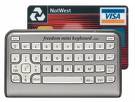
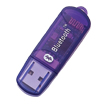
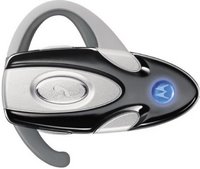
With this I have a mobile office so to speak. I can blog using my mobile (cell) phone and the mini keyboard like I am for this entry.
When I get home I use bluetooth to connect to my LAN and then have broadband speeds without the mobile phone call costs. The mini keyboard is wireless, it takes a few seconds to establish a connection to the phone but then it is all ahead.
I am having to get a used to the layout of the keyboard but it is a great way to be able to blog about my experiences in the real world, now I ust have to work out how to get this from my phone to my blog I am in a word processor so first get home and sync then add pics etc and email away..I hope.
I have a few gadgets (read toys) that I use to make my life a little easier. here is a list of the things I use...
Desktop running XP Pro
O2 smart phone
Freedom thumb board
Bluetooth dongle
Bluetooth headset


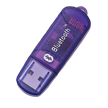

With this I have a mobile office so to speak. I can blog using my mobile (cell) phone and the mini keyboard like I am for this entry.
When I get home I use bluetooth to connect to my LAN and then have broadband speeds without the mobile phone call costs. The mini keyboard is wireless, it takes a few seconds to establish a connection to the phone but then it is all ahead.
I am having to get a used to the layout of the keyboard but it is a great way to be able to blog about my experiences in the real world, now I ust have to work out how to get this from my phone to my blog I am in a word processor so first get home and sync then add pics etc and email away..I hope.
Sunday, June 25, 2006
ECS Motherboards
Over at hardcoreware.net is a "review" on the manufacture of motherboards in china so if you have a few minutes to spare and are intrested in the process involved to make your computer work then check out www.hardcoreware.net
Wednesday, March 8, 2006
"Enlightment" for the masses
Some people will stick anything in a microwave for dramatic effect, me I will just stick to CD's. On the subject of microwaves it is even possible to use a home microwave to "smelt" metals for that ring you where supposed to buy for your girlfriend but spent the money on a new laptop.
WARNING putting metal in a microwave oven is VERY bad unless you know what you are doing so if you have any reservations DONT DO IT...
WARNING putting metal in a microwave oven is VERY bad unless you know what you are doing so if you have any reservations DONT DO IT...
Junk Bots Unite
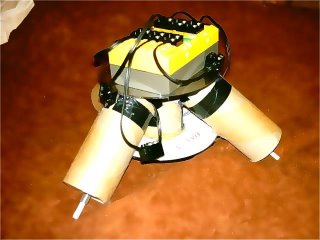
There is this guy over the other side of nowhere that is as twisted as I am, he is into robotics and does some intresting stuff with what other people would junk and throw in the bin. His site is over at sprocket.twistedsouls.com so if you are in to recycling and creating your own "lifeforms" head on over.
Disclaimer: The other guy is my brother who does live on the other side of the country and I do think his stuff is great for what it is not who he is.
Subscribe to:
Posts (Atom)